Instant batch processing
Select multiple PDFs at once, set the output folder, and let OzemPDF handle the rest with real-time progress feedback.
 OzemPDF
PDF Compression for Linux
Pick your files, choose a compression level, and shrink them in seconds. No account, no cloud, no confusion. Just open and go.
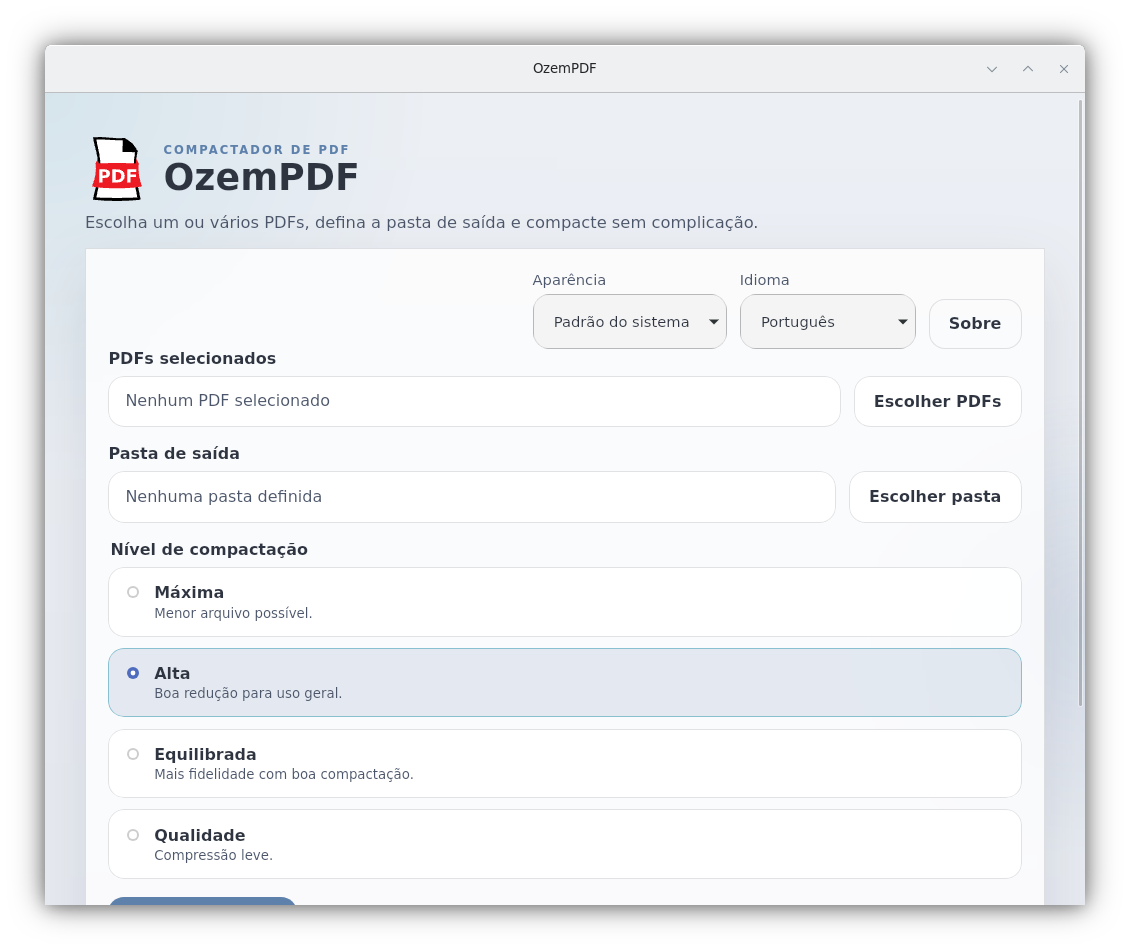
Pick the right balance between file size and quality for your needs.
Smallest possible file size. Best for archival or sharing.
gs /screen
Great reduction for most use cases. Good balance.
gs /ebook
More fidelity with solid compression. Default choice.
gs /printer
Minimal compression. Best for documents that need detail.
gs /prepress
Select multiple PDFs at once, set the output folder, and let OzemPDF handle the rest with real-time progress feedback.
Light mode, dark mode, or synced with your OS. The interface adapts automatically — no configuration needed.
Distributed as a single AppImage file. Download, make executable, and run on Ubuntu, Fedora, Arch, or Debian.
Downloads
Version 0.1.0-beta.2 for Linux x86_64. Free for personal and professional use. Requires Ghostscript installed on your system.